
Release version: 4.3.0 Release date: September 18, 2026
New Features
Demographic Data
Demo Here | Demographic Data
What's new: ParGo now includes Demographic data as its own data type, alongside Listings, Permits, and Financial information, surfaced in the Details Panel next to Residents.
Why it matters: Demographic and area-level insight (population, income, and related figures) previously required pulling data from outside ParGo. It's now part of the same workflow you already use for other property data.
What to expect:
- Find Demographic data in the Details Panel, next to the existing Residents section.
- Demographic data is available as part of Export, Pipeline, and Parcels, and can be referenced through the AI Advisor and Prompt Helper.
Enhancements
Export Configuration & Listing Improvements
Demo Here | Export Configuration
What's new: Exports can now be configured per user: choose exactly which data fields are included in an export before the job runs, add a logo, choose a color palette, set a custom headline and sub-headline, include an additional text block, and set the color used for titles and headings. Separately, listing exports now render links as clickable hyperlinks instead of plain text, include property photos where available, and flag outdated/stale listing data.
Why it matters: Exports previously used a fixed template with no way to brand or customize them or control what was included. Listing exports also required manually copying and pasting URLs, and didn't include photos (a specific pain point raised in feedback). This makes exports both more useful and more usable on their own, without extra manual work.
What to expect:
- Choose which specific data fields are included in an export before running the export job.
- Configure a logo, color palette, headline, sub-headline, and additional text block to appear on your exports.
- Set the color used for titles and headings in an export.
- Listing links in exports and shares are clickable — no more copy-paste into a browser.
- Listing exports display property photos when photo data is available for that listing.
Help & Support Experience
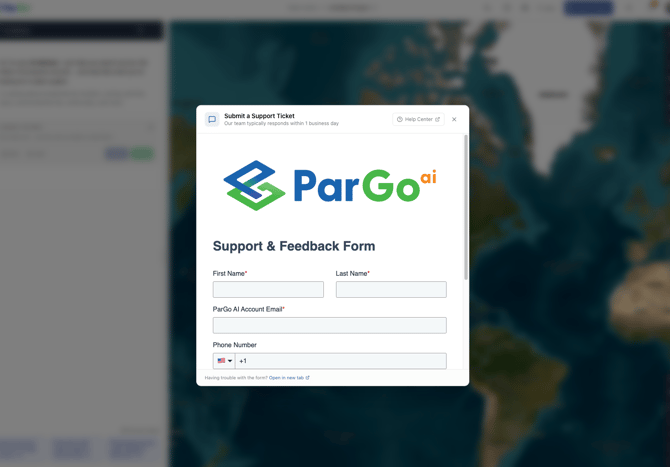
What's new: The Support form now opens as a pop-up inside the app instead of navigating to a new tab, with a refreshed UI. The help ("?") icon is now on the top bar while inside a project, matching its placement on the Dashboard.
Why it matters: Submitting a support request used to take users out of the app entirely, and the help icon inside a project was hard to find (previously only accessible through the user icon menu).
What to expect:
- Click the "?" icon on the top bar, in a project or on the Dashboard, to open the Support form as a pop-up without leaving the app.
- The Support form has an updated look and feel.
Map & Layers
What's new: The parcel layer can now be turned off on the map, and the Educational Structures layer now selects all of its sub-layers by default (previously only 2 of the available sub-layers were selected).
Why it matters: Users previously couldn't hide the parcel layer, and had to manually find and enable additional Educational Structures sub-layers that weren't selected by default.
What to expect:
- Toggle the parcel layer off from the layers panel like any other layer.
- Turning on Educational Structures now shows all of its sub-layers by default; unselect any you don't want.
Platform-Wide Project Sharing (Pargo Admin)
What's new: Pargo (platform) Admins can now share a project with any user account on the platform, not just within their own organization. The share is live, not a copy — the recipient sees the project reflect whatever state it's actually in.
Why it matters: This is primarily a customer-success tool: when a customer needs help with a search or workflow, a Pargo Admin can build out the working project and share it directly with that customer's account, instead of describing the steps manually. If you receive a project shared this way, it will appear the same way any shared project does.
What to expect:
- You may see a project appear that was shared with you by a Pargo Admin, in addition to any shared by your own teammates.
Teams & Organization Collaboration (Enterprise Plan)
What's new: Available to Enterprise Plan customers, ParGo now has a full team collaboration system in the Dashboard. A user can invite another ParGo user to connect; once the invitation is accepted by email, the two users are connected and appear as part of each other's Teams. A user can belong to any number of teams. Organizations also get dedicated admin tools for managing users and credits, a view of who else is in the organization, and the ability to share projects and pipelines within the org.
Why it matters: Previously there was no way to connect with other ParGo users or share work directly between accounts. Now Enterprise teams can collaborate on the same properties, results, and reports without re-sending files or re-describing a search from scratch, and organizations can manage membership and credit allocation from one place.
What to expect:
- This feature is available to Enterprise Plan customers.
- Invite another user to connect from the Teams section of the Dashboard. They'll receive an email invitation and must accept it before the connection is established.
- Once connected, both users see each other under Teams in the Dashboard.
- There's no limit to how many teams a user can belong to.
- Share Projects, Results, Criteria Lists, Reports, DROP Reports, and PDFs with one team or multiple teams at once.
- Users are notified when something is shared with them, so they know to log in and check what's new.
- A user can be removed from a team the same way they were invited.
- Organization admins can add users, allocate credits, and manage user accounts from a dedicated Admin view.
- Any user in an organization can see the other users in that organization.
- Projects and pipelines can be shared directly within an organization.
Fixes
- Projects can now be saved after loading a previously saved results set through the results panel — this no longer silently blocks the project from saving.
- Pipeline creation no longer fails for parcels that were added via "Added by You."
- The AI chat no longer occasionally duplicates a sent message and its response.
- Parcels that share an address with another parcel (e.g., a smaller parcel and a larger one at the same address) can now both be added to the results list.
- The Reset Symbology button on map layers works again and fully restores original default symbology.
- Mobile view no longer cuts off bottom UI components, and side icons are easier to tap.
- Scroll bar styling has been updated for a cleaner look across the app.
Questions?
If you run into any issues or have questions about a specific feature in this release, reach out to your ParGo customer service representative or support@pargoai.com.